Why I'm Making My Own Grocery List
Rolling My Own Grocery List Tool
Last time I wrote about how I am starting a homelab to host a few services I’d like to make available to me personally or the public. In this post I want to detail the first service, which is intended for me (and my household), but which I hope to create a demo version of soon(ish) for public viewing.
So Why Am I Doing This?
3 reasons: autocomplete, multiplayer, category order.
I’ve never been able to find a grocery list solution that satisfies all of these features. So after 7+ years of wanting I’m giving in and making it myself.
Features I “Need”
Need1
Autocomplete
Typing is lame. Pressing buttons is cool 😎. I buy the same things from the grocery store ALL the time. You probably do too. So I shouldn’t have to type the full name of an item every time I add it to the list. It should be offered up based on a prefix, or perhaps fuzzy matching.
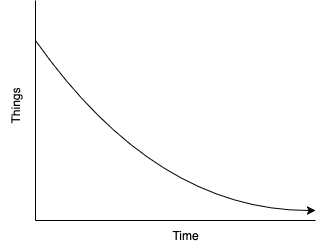
The number of new uniquely named items entered into anyone’s grocery list over time looks like this highly scientific graph:
Multiplayer
I live with other people, we share food and the shopping burden. We all need to be able to read and edit the grocery list.
Categorization and Ordering
I want my grocery list in the order that I will walk through the store. This is the killer feature that I’ve always wanted and have never found, presumably because there is no money in ordering a list, but inherent complexity in the way every grocery store is different.
Tools I’ve Used in the Past
Google Keep
For a long time, I used Google Keep to make grocery lists. It has simple checklists, drag and drop to reorder, and will autocomplete an in-progress list item with previously completed list items.

At the time, I don’t think it allowed sharing/multiplayer, although it does seem to support it now.
It also has no categorization or ordering, so I would manually sort my list or have a chaotic time in the grocery store.
- Autocomplete
- Sharing
- Categorization/Ordering
Notion
When the singleplayer (afaik) nature of Google Keep became an issue, I moved to Notion. It certainly has the ability to let others share and edit the list. It has no autocomplete, but you could potentially hack together some unseemly categorization and ordering with it if you wanted.
I had thought when I switched that I might create this categorization within Notion, but ultimately it was too cumbersome, the UX would be bad, and I didn’t care to.
To get sharing to work still requires convincing others to use a new app but somehow it being trendy and not Google makes it easier.
- Autocomplete
- Sharing
- Categorization/Ordering
What I’m Building
I’m building a React web app and calling it gl. None of my users need to
install anything, and they can make a shortcut on your phone’s homescreen to
open it immediately. I’m using React for 3 reasons:
- like it or not I think it qualifies as boring technology at this point2
- due to its established and widely used nature
claudeis decent at generating mostly-working (although certainly not well made) solutions3 - the
dnd-kitlibrary for react allowed me to get an acceptably working drag-and-drop interface for my sorting and categorization
The web app is powered off of a rust backend serving HTTP endpoints and operating on a SQLite database. The whole stack is hosted on my homelab.
The app includes a simplistic command line interface. Inputing any text is
considered a grocery list item, added when you hit Enter. The exception is if
the input starts with /, in which case it becomes a command. So far I have
commands for /help and a series of Category-manipulation commands.
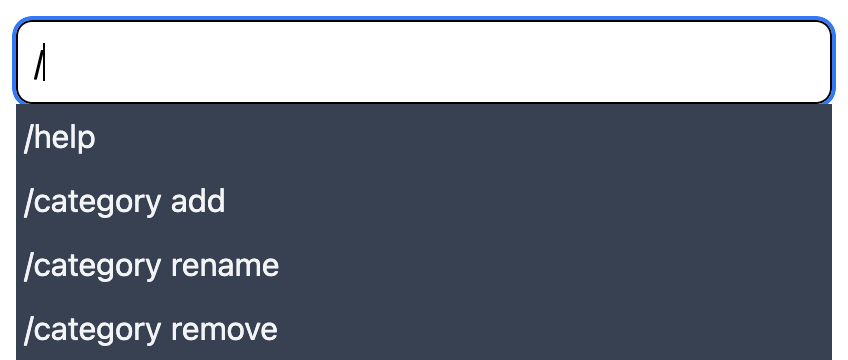
All of these commands have autosuggestions based on previous grocery items or whatever data is relevant to the command in question.
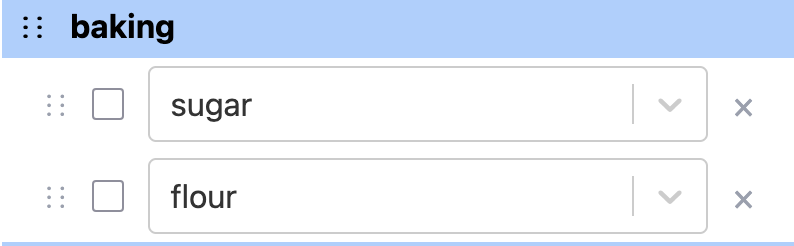
Next we have the grocery list. Populated by the inputs to the CLI component. It
includes drag-and-drop to reorder and recategorize, checkboxes, and delete Xs.
Pretty straightforward all around.
The Workflow
My goal here is to
- define the areas (and order of them) in my grocery store,
- automatically categorize a grocery list item into an area, if possible, based on past item categorization,
- if that’s not possible, mark it uncategorized and let the user categorize it themselves (with the drag-and-drop interface), which leads to future auto-categorization.
This doesn’t mean that every item I pick up will be the first remaining item in the list, but it does mean that I only have to scan the “produce” section when I’m in “produce” and the “dairy” section when I’m in “dairy”, which is good enough for me.
There could be an interesting ML project here for the future, auto-ordering within categories based on previous check-off order.
The manual categorization over time again looks like this graph:
Demo
This is still very much in development and not yet ready for a polished demo,
but you are welcome to boot it yourself and try it out. Just checkout
my homelab and use npm run dev and
cargo run from the gl/ts and gl/rust directories respectively.
I would like to create a demo version of the site as well for a more accessible and durable demo. I’m wary of making a multiplayer demo because that would require some content moderation. I’m considering either a modified frontend that uses a browser-side SQLite database, or an ephemeral backend database per browser.
I’m leaning toward the ephemeral backend database as it wouldn’t require rewriting my database interface layer to run in the browser, but I’m still brainstorming in this area.
Either option requires further work beyond the scope of simply making the app and hosting it, but it’s nice to be able to demo publicly.
Status
At time of publication, gl is basically functional but could use some polish.
However it is usable, so if this is of interest feel free to host it yourself
and try it out.
Footnotes
Need is a strong word. Realistically I don’t “need” any features or even a grocery list at all. These are conveniences I want, not needs.
Not as boring as SQLite certainly, but I feel confident I won’t get burned using React compared to the time I made a web app for contract and chose to use Angular shortly after the switch from AngularJS to Angular (a huge, breaking rewrite) when all the resources I could find still used the older version.
Claude acts very much like a junior dev, making something horribly hacky
but seems to work on the surface. For this project I used claude sparingly,
compared to my previous project pathfinder. I’m planning to write
something up about my experience using claude for pathfinder soon.